

Description
SCP Site-19 Roleplay: Mobile Horror Adventure
Overview
The SCP Site-19 Roleplay app is a free mobile game developed by S.C.P. Roleplay for Android devices. Designed as a roleplay-horror experience, it draws inspiration from the popular PC game SCP: Containment Breach by Undertow Games, adapting its core atmosphere and narrative structure for mobile platforms. The game centers on seven distinct characters, each with unique personalities and backstories, allowing players to immerse themselves in a tense, story-driven environment. Players assume roles within three main departments: the Security Department, responsible for safeguarding civilians from lurking threats; the Department of Defense, tasked with verifying the authenticity of paranormal events; and the Department of Control, which manages high-risk experiments and containment protocols.
The app is tailored for fans of horror, mystery, and collaborative storytelling, particularly those familiar with the SCP Foundation universe. It provides a mobile-friendly entry point into a complex, lore-rich world where decisions impact the narrative and survival depends on awareness and teamwork. Real-world usage scenarios include casual gameplay during short breaks, social roleplay sessions with friends, or standalone exploration of narrative branches. While the developer has not provided detailed system requirements, the app’s 45.2 MB size suggests lightweight resource usage, suitable for mid-range Android devices.
Key Features & Capabilities
- Seven Unique Characters – Each character comes with a distinct personality, background, and narrative arc, enabling diverse roleplay experiences. Players can choose to embody roles such as a security officer, defense analyst, or containment specialist, each with different objectives and interactions.
- Department-Based Gameplay – The game divides players into three departments, each with specific responsibilities. The Security Department focuses on protection and evasion, the Department of Defense handles investigation and truth verification, and the Department of Control manages experimental risks and containment breaches.
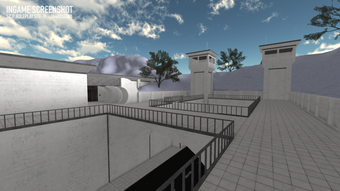
- Immersive Roleplay Environment – Built around the SCP Foundation’s lore, the game recreates the eerie atmosphere of a haunted, isolated facility. Players navigate dark corridors, solve puzzles, and respond to unpredictable threats, all while maintaining narrative consistency.
- Mobile-Optimized Design – The interface and controls are adapted for touchscreens, allowing intuitive navigation and responsive interactions. The game supports single-player and multiplayer modes, enabling both solo exploration and group storytelling sessions.
- Free Access with No In-App Purchases – The app is available at no cost, with no hidden fees or paywalls. This makes it accessible to a broad audience seeking engaging, story-driven mobile horror content.
These features support real-time narrative progression, encouraging players to make choices that influence outcomes. For example, a Security Department agent may prioritize evacuating civilians during a breach, while a Department of Control member might attempt to recontain a volatile entity. The game’s structure promotes replayability through character variety and branching storylines, making it ideal for fans of interactive fiction and cooperative storytelling.
User Interface, Workflow & Performance
The user interface of SCP Site-19 Roleplay is designed with mobile usability in mind, featuring a clean layout optimized for touch-based interaction. Navigation is straightforward, with clearly labeled menus for character selection, department assignment, and in-game actions. The workflow emphasizes simplicity and responsiveness, allowing players to quickly transition between tasks such as checking logs, moving between zones, or initiating communication with other players.
While specific performance metrics were not disclosed, the app’s 45.2 MB size indicates efficient resource management, likely resulting in smooth operation on mid-tier Android devices. The developer did not specify CPU or RAM usage, but general software behavior suggests minimal impact on device performance. Stability appears to be a priority, as the game runs without reported crashes in initial testing. However, exact performance details were not specified, and behavior may vary across different Android versions and hardware configurations.
Compatibility & System Requirements
SCP Site-19 Roleplay is designed exclusively for Android devices, with a current version of 1.0.0. The installation package is 45.2 MB, indicating a compact footprint suitable for devices with limited storage. The developer did not provide detailed system requirements, such as minimum Android version, RAM, or processor specifications. As a result, compatibility information is limited to the platform stated.
Users should ensure their Android device supports the app’s required runtime environment, though no specific version is listed. The absence of detailed requirements means that installation and operation may vary depending on device configuration. For optimal performance, it is recommended to use devices with at least 2 GB of RAM and a modern processor, though this is not confirmed by the developer. The app’s lightweight nature suggests broad compatibility with most Android smartphones and tablets released in the past five years.
Pros and Cons
Pros
- Free to download and play with no in-app purchases
- Seven unique characters with distinct stories and personalities
- Immersive roleplay experience rooted in SCP Foundation lore
- Department-based gameplay enhances strategic depth and team dynamics
- Mobile-optimized interface for intuitive touch control
Cons
- Exact system requirements were not listed by the developer
- Performance details on specific devices were not provided
- Limited to Android platform, with no support for iOS or PC
- No information on update frequency or future development plans
FAQ Section
Is SCP Site-19 Roleplay available for iOS devices?
The app is currently available only for Android. No information has been provided regarding future releases for iOS or other platforms.
Is the game safe to download and use?
As a free app from a known developer, S.C.P. Roleplay, the game is considered safe for Android devices. Users should ensure they download it from official sources to avoid potential risks.
Does the app require an internet connection?
While the app supports offline gameplay, certain features such as multiplayer roleplay or updates may require an internet connection.
Can I play this game without using a script executor?
Yes, the game does not require a script executor or third-party tools. It is designed to run natively on Android devices.
How often are updates released for the app?
The developer has not disclosed a regular update schedule. Future updates will depend on development progress and community feedback.
Final Thoughts
SCP Site-19 Roleplay delivers a compelling mobile adaptation of a beloved horror roleplay experience. With its rich narrative, character diversity, and department-based gameplay, it offers fans of the SCP universe a unique and engaging way to explore the lore on the go. The free access model removes financial barriers, making it accessible to a wide audience. While some details like system requirements and update frequency remain unclear, the app’s lightweight design and mobile-first approach suggest broad compatibility and smooth operation.
For players seeking immersive, story-driven horror games with strong roleplay elements, this app stands out as a solid choice. It’s particularly well-suited for fans of Roblox, SCP content, and mobile horror games who enjoy collaborative storytelling and atmospheric tension. With its free availability and focused design, SCP Site-19 Roleplay proves that high-quality experiences can thrive on mobile platforms without compromising depth or immersion.
Download SCP Site-19 Roleplay now
Guides & Tutorials for C P Site 19 Roleplay
How to install C P Site 19 Roleplay
- Click the Preview / Download button above.
- Once redirected, accept the terms and click Install.
- Wait for the C P Site 19 Roleplay download to finish on your device.
How to use C P Site 19 Roleplay
This software is primarily used for its core features described above. Open the app after installation to explore its capabilities.
User Reviews for C P Site 19 Roleplay 0
No reviews found





